
Prompt Management: How to Stop Losing Track of Your Prompts
Learn how RezunateLLM's prompt management replaces scattered docs and Slack threads with version history, rollback, and a proper home for every prompt your team ships.


If you ask most teams how they manage their prompts, you’ll probably get the same response: a shared doc, a Slack thread, or text buried somewhere in the codebase. Prompt management gets treated like a nice-to-have something for consistency and tidiness, not something for convenience.
This is the everyday reality for most teams building AI products. Prompts, the instructions that shape how an AI product sounds, what it knows to say, and how consistent it is, are still treated like scraps of text, dropped into a file wherever they’re needed. Prompt management is the practice of fixing that: giving prompts a proper home, so the people who write them and the people who ship them aren’t working against each other.
Why Do We Need a Prompt Management System?
Writing a prompt once and hardcoding it feels fine at first. But prompting isn’t really a one-and-done task, it’s closer to writing a piece of copy that keeps getting refined. OpenAI’s own guidance on prompt engineering points out that certain wording and structures simply work better, and finding them takes trial and adjustment rather than a single perfect draft. Anthropic makes a similar point in its guide to prompt engineering, describing good prompting as something you refine over time, watching closely how small changes in wording shift the result. Palantir’s own engineering documentation agrees, calling effective prompt engineering a dynamic, ongoing process rather than something you set once and forget.
If a prompt is going to change often, a few basic questions come up every time it does:
- What does the prompt say right now?
- What did it say before, in case the new version doesn’t work as well?
- Who changed it, and why?
- Was it actually reviewed before going live?
None of that is easy to answer when a prompt is just a line of text sitting inside your codebase. And because it’s inside the code, even a tiny wording fix, softening a sentence, correcting a typo has to wait for a full deployment of the code. DigitalOcean's prompt engineering guide makes the point that good prompts come from testing and refining them repeatedly, which is hard to do when every refinement means going through your engineering team’s release schedule.
A prompt management system solves this by giving prompts their own home, separate from the rest of the codebase. That means the wording can change on its own schedule, without waiting on everything else your team is building.
The Real Cost of Skipping Prompt Management
Skipping prompt management rarely blows up all at once. It shows up as a small friction that piles up, until one day someone asks, “wait, which version of this is actually live?” and nobody has a confident answer.
This is common enough that it shows up in research on AI teams. One analysis of common issues AI teams run into in production found that prompt changes are one of the most frequent causes of things going wrong, largely because most teams have no easy way to see what changed and connect it back to why results shifted. Without that, figuring out what broke turns into guesswork, and the same kind of mistake tends to happen again.
The pattern tends to look familiar:
- Prompts end up scattered. One version lives in the code, another sits in a shared doc someone drafted, a third was pasted into a chat thread the last time someone made a quick fix. Nobody’s fully sure which one is actually running.
- The people who understand the prompt best get shut out. Subject matter experts, support leads, and product managers usually know exactly how something should be worded, but if changing it means going through an engineer, that knowledge gets passed along secondhand, and something always gets lost in translation.
- Rolling back is harder than it should be. “Just go back to the old version” only works if the old version was actually saved somewhere you can find it.
None of this needs to be a disaster to be costly. It’s slow, it adds up, and it’s the kind of cost that rarely gets flagged, right up until a team spends an afternoon trying to figure out why a customer-facing assistant suddenly sounds different, only to find out someone quietly tweaked a line of text with no record of it anywhere.
Even outside of individual companies, the thinking on this is shifting. Researchers studying how prompts should be governed in public systems have argued that the instructions behind an AI system deserve the same structure, review, and change history as any other important piece of the system, not something bolted on as an afterthought.
How RezunateLLM Helps With Prompt Management
RezunateLLM’s prompt management was built around a simple idea: the person who understands what a prompt needs to say shouldn’t have to go through an engineer to say it. That means it’s built first for subject matter experts, support leads, compliance reviewers, and product managers, the people closest to the words themselves, not just for developers.
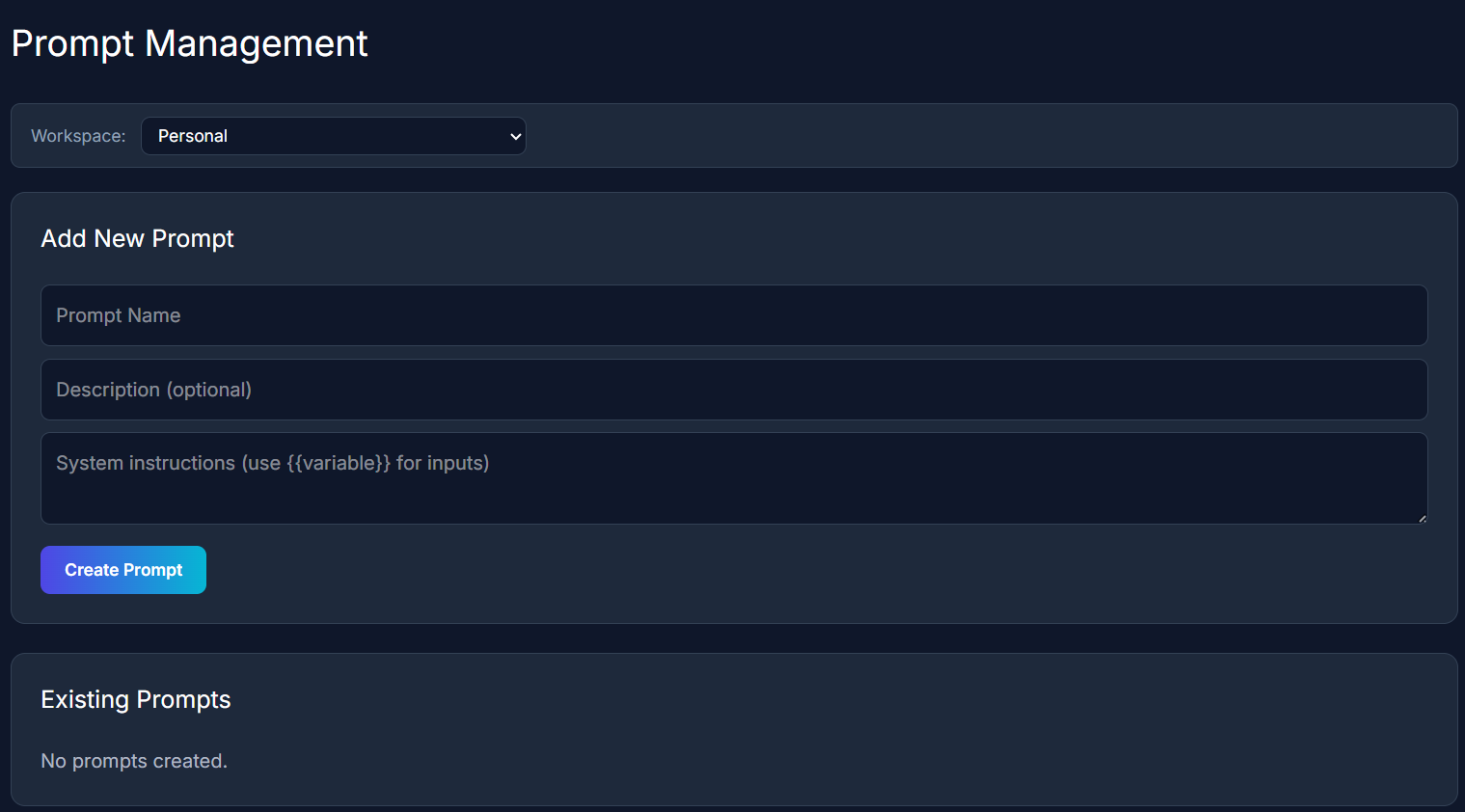
Here’s what that looks like in practice:
- Prompts get a proper spot, not a hiding spot. Instead of living inside code, a prompt lives on the prompt management system built by RezunateLLM with its own record, with a name, a description anyone on the team can understand at a glance. No digging through a codebase to find the right file.
- Every version is kept, not overwritten. When a prompt is updated, RezunateLLM saves the new version without deleting the old one. That means you can always look back and see exactly what a prompt used to say, compare it to what it says now, and understand what changed.
- Updates go live on their own schedule. Because prompts don’t live inside your product’s code, a wording change doesn’t need to wait for your next release.
- You can always go back. If a new version of a prompt underperforms, RezunateLLM lets you switch back to the version that worked, right away, instead of scrambling to reconstruct it from memory or an old Slack thread.
Put together, this turns prompt writing into something closer to editing a shared document than shipping code. Subject matter experts get to work directly in their own language, engineers get a clear history of what changed and when, and nobody has to choose between moving fast and knowing exactly what’s live.
Good prompts shouldn’t require a detour through engineering every time they need a small improvement. That’s the gap RezunateLLM’s prompt management is built to close.
See how RezunateLLM helps you manage and secure every prompt in production.